



Quando un servizio va giù, la prima domanda che si pone chiunque lo utilizzi è sempre la stessa: “è un problema mio o il server è down?”.
Una status page pubblica risolve elegantemente questo problema, dando visibilità trasparente sullo stato dei propri servizi senza dover rispondere a decine di messaggi durante un disservizio.
Kener è una soluzione open source per status page e uptime monitoring costruita su SvelteKit e pensata per essere leggera da self-hostare pur offrendo funzionalità che normalmente si trovano solo in prodotti SaaS a pagamento: gestione incidenti, finestre di manutenzione programmate, notifiche multi-canale, badge di stato incorporabili e supporto multilingua.
Il tutto distribuito con licenza MIT e un’immagine Docker pronta all’uso.
In questo articolo vedremo come installare Kener su una macchina Ubuntu Server 26.04 LTS tramite Docker Compose affiancandolo a Redis (dipendenza obbligatoria per cache e scheduler) e a un volume persistente per il database SQLite.
Copriremo anche alcuni accorgimenti pratici emersi direttamente durante l’installazione come la corretta gestione dei permessi sul volume dati e la scelta tra deployment in root o in subpath utili per evitare gli errori più comuni che si incontrano al primo avvio.
PREREQUISITI
- Ubuntu Server 26.04 aggiornato
- Docker Engine + Docker Compose plugin installati
- Una porta libera sull’host (default 3000)
INSTALLAZIONE DI DOCKER
Se Docker non è ancora installato eseguire i comandi:
|
0 1 2 3 4 5 6 7 8 9 10 11 12 |
sudo apt update sudo apt install -y ca-certificates curl gnupg sudo install -m 0755 -d /etc/apt/keyrings curl -fsSL https://download.docker.com/linux/ubuntu/gpg | sudo gpg --dearmor -o /etc/apt/keyrings/docker.gpg echo "deb [arch=$(dpkg --print-architecture) signed-by=/etc/apt/keyrings/docker.gpg] https://download.docker.com/linux/ubuntu \ $(. /etc/os-release && echo $VERSION_CODENAME) stable" | sudo tee /etc/apt/sources.list.d/docker.list > /dev/null sudo apt update sudo apt install -y docker-ce docker-ce-cli containerd.io docker-compose-plugin |
CREAZIONE STRUTTURA DELLE CARTELLE
|
0 1 2 |
mkdir -p /opt/kener/database cd /opt/kener |
CONFIGURAZIONE FILE DOCKER COMPOSE
Creare il file di configurazione con il comando:
|
0 |
nano /opt/kener/docker-compose.yml |
Quindi incollare il segente contenuto:
|
0 1 2 3 4 5 6 7 8 9 10 11 12 13 14 15 16 17 18 19 20 |
services: kener-redis: image: redis:7-alpine container_name: kener-redis restart: unless-stopped kener: image: docker.io/rajnandan1/kener:latest-status container_name: kener-status restart: unless-stopped depends_on: - kener-redis ports: - "3000:3000" volumes: - ./database:/app/database environment: - KENER_SECRET_KEY=CAMBIA_QUESTA_STRINGA_CASUALE - ORIGIN=http://IP_O_DOMINIO:3000 - REDIS_URL=redis://kener-redis:6379 - TZ=Europe/Rome |
Salvare e chiudere il file di configurazione
Generare una secret key sicura con il comando:
|
0 |
openssl rand -hex 32 |
Sostituire il valore generato al posto di CAMBIA_QUESTA_STRINGA_CASUALE, e impostare ORIGIN con l’IP o il dominio reale che userai per accedere.
CONFIGURAZIONE DEI PERMESSI
Eseguire i comandi in sequenza:
|
0 1 2 |
docker compose down sudo chown -R 1000:1000 /opt/kener/database docker compose up -d |
AVVIO DELLO STACK
Avviare lo stack con i seguenti comandi:
|
0 1 2 |
cd /opt/kener docker compose up -d |
Dovremmo visualizzare il seguente output:
|
0 1 2 3 4 5 |
[+] up 35/35 ✔ Image docker.io/rajnandan1/kener:latest-status Pulled 11.2s ✔ Image redis:7-alpine Pulled 4.2s ✔ Network kener_default Created 0.0s ✔ Container kener-redis Started 5.1s ✔ Container kener-status Started |
Verificare lo stato di docker con i seguenti comandi:
|
0 |
docker compose ps |
Dovremmo vedere un output simile al seguente:
|
0 1 2 |
NAME IMAGE COMMAND SERVICE CREATED STATUS PORTS kener-redis redis:7-alpine "docker-entrypoint.s…" kener-redis About a minute ago Up About a minute 6379/tcp kener-status docker.io/rajnandan1/kener:latest-status "./docker-entrypoint…" kener About a minute ago Up About a minute (healthy) 0.0.0.0:3000->3000/tcp, [::]:3000->3000/tcp |
Eseguire quindi il comando:
|
0 |
docker compose logs -f kener |
Se è tutto OK dovremmo visualizzare il seguente output:
|
0 1 2 3 4 5 6 7 8 9 10 11 12 13 14 15 16 17 18 19 20 21 22 23 24 25 26 27 28 29 30 31 32 33 34 35 36 37 38 39 40 41 42 43 44 45 46 47 48 49 50 |
kener-status | [dotenv@17.2.4] injecting env (0) from .env -- tip: ⚙️ enable debug logging with { debug: true } kener-status | [dotenv@17.2.4] injecting env (0) from .env -- tip: ⚙️ load multiple .env files with { path: ['.env.local', '.env'] } kener-status | Configuring database with type sqlite kener-status | [dotenv@17.2.4] injecting env (0) from .env -- tip: 🔑 add access controls to secrets: https://dotenvx.com/ops kener-status | [dotenv@17.2.4] injecting env (0) from .env -- tip: 🔑 add access controls to secrets: https://dotenvx.com/ops kener-status | [dotenv@17.2.4] injecting env (0) from .env -- tip: 🔐 encrypt with Dotenvx: https://dotenvx.com kener-status | [dotenv@17.2.4] injecting env (0) from .env -- tip: 🔐 prevent committing .env to code: https://dotenvx.com/precommit kener-status | Configuring database with type sqlite kener-status | [dotenv@17.2.4] injecting env (0) from .env -- tip: 🔐 prevent committing .env to code: https://dotenvx.com/precommit kener-status | [dotenv@17.2.4] injecting env (0) from .env -- tip: ✅ audit secrets and track compliance: https://dotenvx.com/ops kener-status | Error running migrations: SqliteError: unable to open database file kener-status | at new Database (/app/node_modules/better-sqlite3/lib/database.js:69:26) kener-status | at Client_BetterSQLite3.acquireRawConnection (/app/node_modules/knex/lib/dialects/better-sqlite3/index.js:14:12) kener-status | at create (/app/node_modules/knex/lib/client.js:262:39) kener-status | at process.processTicksAndRejections (node:internal/process/task_queues:104:5) { kener-status | code: 'SQLITE_CANTOPEN' kener-status | } kener-status | Running seed... kener-status | Error running seed: Error: Error while executing "/app/seeds/generate_template.ts" seed: unable to open database file kener-status | at Seeder._waterfallBatch (/app/node_modules/knex/lib/migrations/seed/Seeder.js:118:23) kener-status | SqliteError: unable to open database file kener-status | at new Database (/app/node_modules/better-sqlite3/lib/database.js:69:26) kener-status | at Client_BetterSQLite3.acquireRawConnection (/app/node_modules/knex/lib/dialects/better-sqlite3/index.js:14:12) kener-status | at create (/app/node_modules/knex/lib/client.js:262:39) { kener-status | original: SqliteError: unable to open database file kener-status | at new Database (/app/node_modules/better-sqlite3/lib/database.js:69:26) kener-status | at Client_BetterSQLite3.acquireRawConnection (/app/node_modules/knex/lib/dialects/better-sqlite3/index.js:14:12) kener-status | at create (/app/node_modules/knex/lib/client.js:262:39) { kener-status | code: 'SQLITE_CANTOPEN' kener-status | } kener-status | } kener-status | Kener is running on port 3000! kener-status | Using option immediately with every does not affect the job's schedule. Job will run immediately anyway. kener-status | Maintenance event scheduler started (runs every hour) kener-status | Daily cleanup scheduler started (runs at 00:00 UTC) kener-status | Running maintenance event scheduler... kener-status | Error processing maintenances for event generation: SqliteError: unable to open database file kener-status | at new Database (/app/node_modules/better-sqlite3/lib/database.js:69:26) kener-status | at Client_BetterSQLite3.acquireRawConnection (/app/node_modules/knex/lib/dialects/better-sqlite3/index.js:14:12) kener-status | at create (/app/node_modules/knex/lib/client.js:262:39) kener-status | at process.processTicksAndRejections (node:internal/process/task_queues:104:5) { kener-status | code: 'SQLITE_CANTOPEN' kener-status | } kener-status | Maintenance scheduler completed. Processed 0 maintenances, created 0 events. kener-status | _ __ _ _ _ _ kener-status | | |/ /___ _ __ ___ _ __ __ _| || | / | / | kener-status | | ' // _ \ '_ \ / _ \ '__| \ \ / / || |_ | | | | kener-status | | . \ __/ | | | __/ | \ V /|__ _|| |_| | kener-status | |_|\_\___|_| |_|\___|_| \_/ |_|(_)_(_)_| kener-status | kener-status | Kener version 4.1.1 is running! |
PRIMO ACCESSO DA WEBGUI
Aprire il browser e richiamare il link:
http://IP_DEL_SERVER:3000/status/account/signin
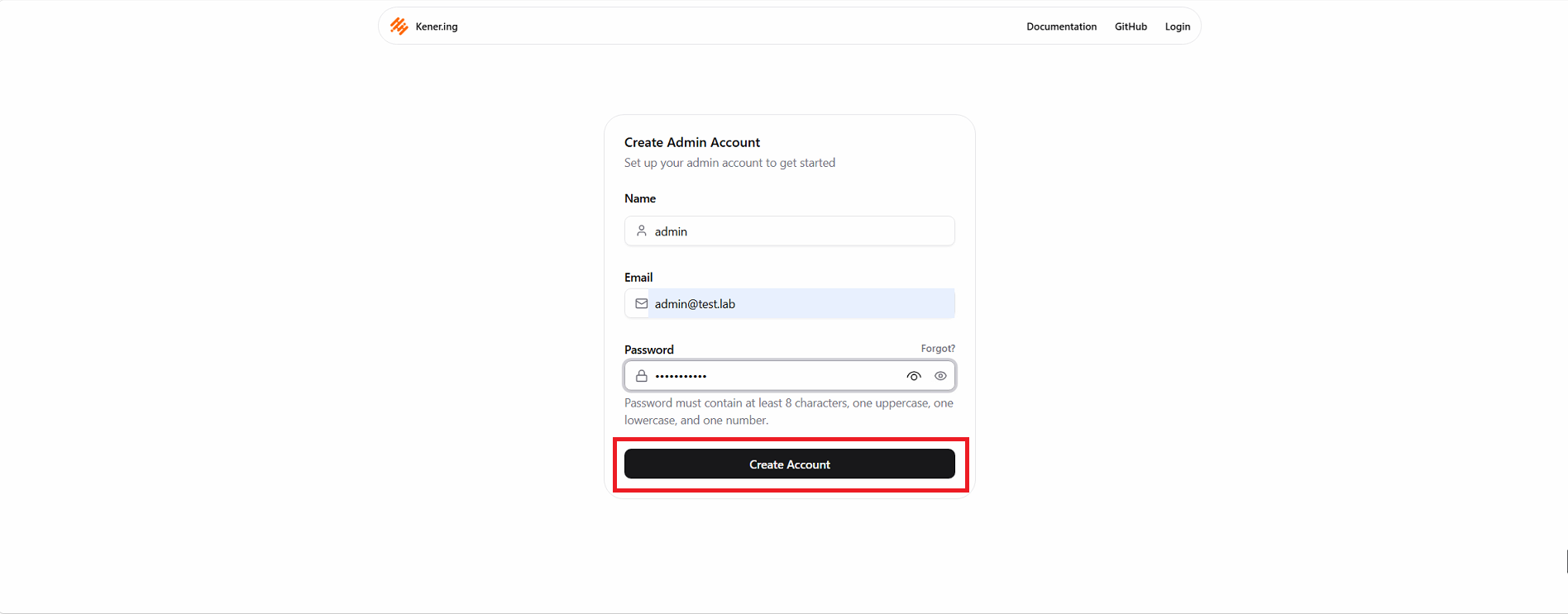
Al primo avvio partirà il wizard di setup per creare l’account amministratore.
Inserire il nome dell’utente, la mail e password quindi cliccare Create Account
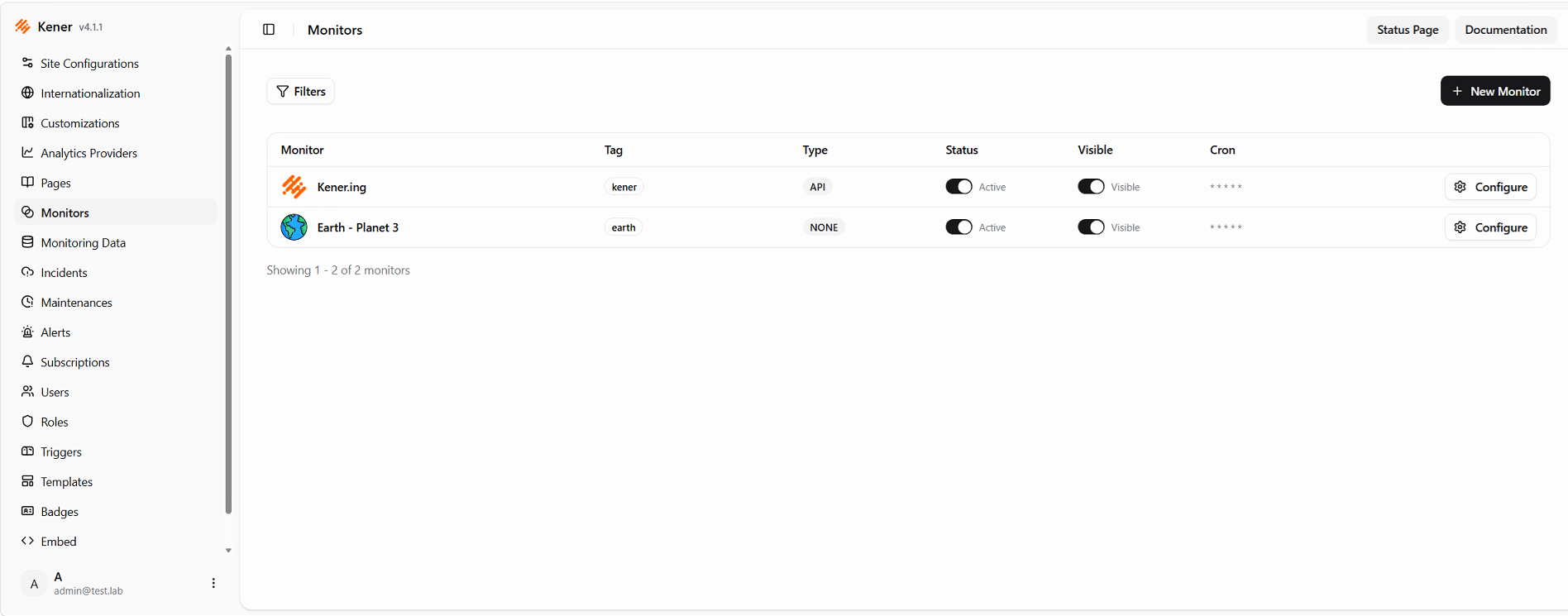
Se è andato tutto a buon fine dovremmo visualizzare la Dashboard di Kener
CARATTERISTICHE DI KENER
Ecco l’elenco dettagliato delle caratteristiche di Kener organizzato per area funzionale:
Monitoraggio dei servizi
- 11 tipi di monitor supportati: HTTP/API, TCP, Ping, DNS, SSL, SQL e altri protocolli comuni
- Scheduling basato su cron, con intervallo minimo di 1 minuto per check
- Configurazione flessibile via YAML: puoi definire tu stesso la logica che determina se un servizio è UP, DOWN o DEGRADED, non solo un semplice check binario
- Stato di default configurabile per un monitor (es. defaultStatus=DOWN se non viene ricevuto un aggiornamento entro l’intervallo previsto)
- Data Explorer: sezione per ispezionare lo storico dei check, analizzare i fallimenti e i trend di uptime nel tempo
Gestione incidenti
- Creazione incidenti tramite GitHub Issues con rich text, oppure via API REST dedicate
- Sistema di trigger: condizioni intelligenti per instradare automaticamente notifiche e automazioni operative in base agli eventi
- Template di messaggistica: modelli riutilizzabili per standardizzare le comunicazioni di incidenti e notifiche
Manutenzioni programmate
- Pianificazione di maintenance window con scheduler dedicato (nei log lo hai visto girare ogni ora)
- Generazione automatica degli eventi di manutenzione associati ai monitor
Notifiche
- Supporto nativo per Slack, Discord, webhook generici
- Sistema di notifica per i subscriber della status page (utenti finali che vogliono essere avvisati sui disservizi)
Interfaccia e personalizzazione
- Tema chiaro/scuro
- Costruito su SvelteKit + shadcn-svelte, interfaccia moderna e reattiva
- Responsive design per dispositivi mobili
- 100% accessibility score dichiarato
- Supporto multilingua: 21 lingue disponibili
- Badge generator per stato e uptime dei singoli monitor, embeddabili altrove
- Widget/iframe embed per integrare un monitor in altre pagine/dashboard
- Dominio personalizzato supportato
- SEO e social media ready (meta tag automatici)
Sicurezza e gestione accessi
- Vault/secret management: storage sicuro per chiavi e credenziali usate nelle integrazioni
- API Key management: emissione e revoca di chiavi per automazioni e integrazioni di terze parti
- KENER_SECRET_KEY dedicata per la sicurezza delle sessioni
Analytics
- Integrazione con provider esterni: Google Analytics, Plausible, Mixpanel, Umami, Microsoft Clarity e altri
Deployment e infrastruttura
- Immagine Docker ufficiale pronta all’uso, deploy dichiarato “in meno di 2 minuti” con Docker Compose
- Redis obbligatorio come dipendenza per cache, sessioni e coda dei job di scheduling
- Storage SQLite locale, senza necessità di un database esterno separato
- Supporto base path per hosting sotto Kubernetes/subpath
- Licenza MIT, quasi 5.000 star su GitHub
- Nessun supporto commerciale/SLA ufficiale — progetto community-driven, quindi da valutare in ottica di rischio se lo porti in produzione critica





0 Commenti