



Liferay è una soluzione per la creazione e gestione di portali e di interfaccia di collegamento tramite portlet verso alcuni middleware come ad esempio CMDBuild
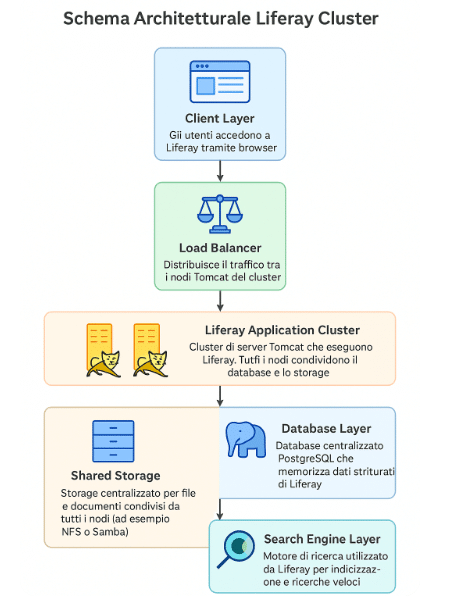
Questa guida si propone di installare LIFERAY PORTAL in configurazione cluster
Il Progetto è stato pensato per permettere agli utenti di gestire le richieste di intervento attraverso un Portale Utenti.
La soluzione prevede 6 VM/host tutte Ubuntu 24.04:
PREREQUISITI
TOMCAT1 (apache tomcat versione 9)
TOMCAT2 (apache tomcat versione 9)
HAPROXY (HAProxy version 2.8.5-1ubuntu3.4 2025/10/01)
NFS (nfs-kernel-server/noble-updates,now 1:2.6.4-3ubuntu5.1 amd64)
DB (psql (18.0 (Ubuntu 18.0-1.pgdg24.04+3)))
ELK (ElasticSearch version 7.17.26,lucene_version 8.11.3)
Nota veloce sulle versioni raccomandate (stato al 05-ott-2025):
Liferay: Liferay 7.4.x (rolling GA releases GA132
Tomcat (certificato per Liferay 7.4): usare Tomcat 9.0.x
HAProxy: versione 3.2 LTS (3.2.0 LTS rilasciata 24-giu-2025)
Java (runtime): Liferay raccomanda JDK 21 (JDK 21 è runtime raccomandato nelle compatibilità). Usa Eclipse Temurin/Adoptium per i binari JDK
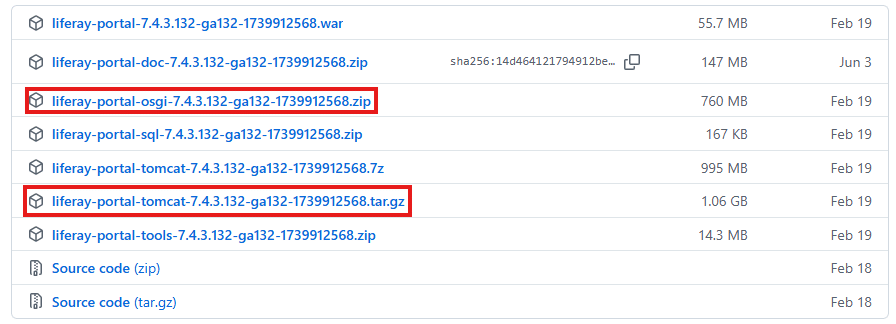
Liferay, tomcat e i file osgi vengono scaricati da https://github.com/liferay/liferay-portal/releases ed in particolare:
INSTALLAZIONE E CONFIGURAZIONE VM
ELASTICSEARCH
Dopo aver installato la VM eseguire i seguenti comandi:
|
0 1 2 3 4 5 6 7 8 9 10 11 12 |
sudo apt update && sudo apt upgrade -y sudo apt install -y vim curl wget unzip software-properties-common # crea utente liferay (opzionale) sudo useradd -m -s /bin/bash liferay || true sudo apt install openjdk-17-jdk -y java -version echo "JAVA_HOME=/usr/lib/jvm/java-17-openjdk-amd64" | sudo tee -a /etc/environment source /etc/environment wget https://artifacts.elastic.co/downloads/elasticsearch/elasticsearch-7.17.26-amd64.deb dpkg -i elasticsearch-7.17.26-amd64.deb sudo systemctl enable --now elasticsearch sudo systemctl status elasticsearch /usr/share/elasticsearch/bin/elasticsearch-setup-passwords auto (IMPOSTARE PWD) |
Modificare il file /etc/elasticsearch/elasticsearch.yml impostando i seguenti parametri:
- cluster.name: liferay
- node.name: nodo-1
- network.host: 0.0.0.0
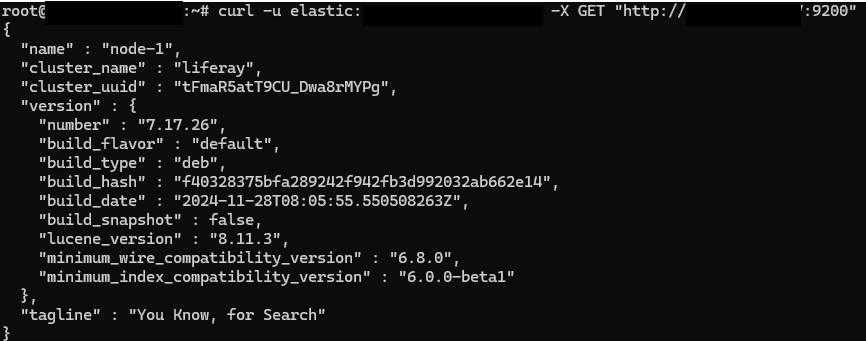
Eseguire il restart del servizio systemctl restart elasticsearch e verificare il servzio:
HAPROXY
Dopo aver installato la VM eseguire i seguenti comandi:
|
0 1 2 3 4 5 6 7 8 |
sudo apt update && sudo apt upgrade -y sudo apt install -y vim curl wget unzip software-properties-common # crea utente liferay (opzionale) sudo useradd -m -s /bin/bash liferay || true sudo apt install -y haproxy mkdir -p /etc/haproxy/certs openssl req -new -x509 -days 3650 -nodes -out test.local.crt -keyout test.local.key cat test.local.key test.local.crt > /etc/haproxy/certs/test.local.pem chmod 600 /etc/haproxy/certs/test.local.pem |
Modificare il file /etc/haproxy/haproxy.cfg:
|
0 1 2 3 4 5 6 7 8 9 10 11 12 13 14 15 16 17 18 19 20 21 22 23 24 25 26 27 28 29 30 31 32 33 34 35 36 37 38 39 40 41 42 43 44 45 46 47 48 49 50 51 52 53 54 55 |
global log /dev/log local0 log /dev/log local1 notice chroot /var/lib/haproxy stats socket /run/haproxy/admin.sock mode 660 level admin stats timeout 30s user haproxy group haproxy daemon nbthread 4 tune.ssl.default-dh-param 2048 # Default SSL material locations ca-base /etc/ssl/certs crt-base /etc/ssl/private # See: https://ssl-config.mozilla.org/#server=haproxy&server-version=2.0.3&config=intermediate ssl-default-bind-ciphers ECDHE-ECDSA-AES128-GCM-SHA256:ECDHE-RSA-AES128-GCM-SHA256:ECDHE-ECDSA-AES256-GCM-SHA384:ECDHE-RSA-AES256-GCM-SHA384:ECDHE-ECDSA-CHACHA20-POLY1305:ECDHE-RSA-CHACHA20-POLY1305:DHE-RSA-AES128-GCM-SHA256:DHE-RSA-AES256-GCM-SHA384 ssl-default-bind-ciphersuites TLS_AES_128_GCM_SHA256:TLS_AES_256_GCM_SHA384:TLS_CHACHA20_POLY1305_SHA256 ssl-default-bind-options ssl-min-ver TLSv1.2 no-tls-tickets defaults log global mode http option httplog option dontlognull timeout connect 5000 timeout client 50000 timeout server 50000 errorfile 400 /etc/haproxy/errors/400.http errorfile 403 /etc/haproxy/errors/403.http errorfile 408 /etc/haproxy/errors/408.http errorfile 500 /etc/haproxy/errors/500.http errorfile 502 /etc/haproxy/errors/502.http errorfile 503 /etc/haproxy/errors/503.http errorfile 504 /etc/haproxy/errors/504.http frontend http-in bind *:80 # redirect http -> https redirect scheme https code 301 if !{ ssl_fc } frontend https-in bind *:443 ssl crt /etc/haproxy/certs/test.local.pem mode http option forwardfor default_backend liferay-backend backend liferay-backend mode http balance source option forwardfor option httpchk GET /web/ # puoi usare un URL di healthcheck piu' sensato option http-server-close http-request set-header X-Forwarded-Proto https if { ssl_fc } http-request set-header X-Forwarded-Host %[req.hdr(host)] http-request set-header X-Forwarded-Port %[dst_port] cookie JSESSIONID prefix server app1 TOMCAT1:8443 check ssl verify none cookie app1 server app2 TOMCAT2:8443 check ssl verify none cookie app2 |
Eseguire il restart e abilitazione del servizio systemctl restart haproxy; systemctl enable haproxy
NFS
Dopo aver installato la VM eseguire i seguenti comandi:
|
0 1 2 3 4 5 6 7 8 9 10 |
sudo apt update && sudo apt upgrade -y sudo apt install -y vim curl wget unzip software-properties-common sudo useradd -m -s /bin/bash liferay || true sudo apt install -y nfs-kernel-server sudo mkdir -p /srv/liferay-data sudo chown liferay:liferay /srv/liferay-data # o uid/gid appropriato # Esporta a rete (esempio IP privati) echo "/srv/liferay-data NFS-IP(rw,sync,no_subtree_check) /srv/liferay-data NFS-IP (rw,sync,no_subtree_check)" | sudo tee -a /etc/exports sudo exportfs -rav sudo systemctl enable --now nfs-server |
DATABASE
Dopo aver installato la VM eseguire i seguenti comandi:
|
0 1 2 3 4 5 6 7 8 9 10 11 12 13 14 15 16 |
sudo apt update && sudo apt upgrade -y sudo apt install -y vim curl wget unzip software-properties-common # crea utente liferay (opzionale) sudo useradd -m -s /bin/bash liferay || true sudo apt update sudo apt install -y wget ca-certificates echo "deb https://apt.postgresql.org/pub/repos/apt $(lsb_release -cs)-pgdg main" | sudo tee /etc/apt/sources.list.d/pgdg.list wget --quiet -O - https://www.postgresql.org/media/keys/ACCC4CF8.asc | sudo apt-key add - sudo apt update sudo apt install -y postgresql postgresql-contrib sudo systemctl enable --now postgresql sudo -u postgres psql -c "CREATE USER liferay WITH PASSWORD 'XXXX';" sudo -u postgres psql -c "CREATE DATABASE lportal OWNER liferay ENCODING 'UTF8';" sudo -u postgres psql -d lportal -c "CREATE TABLE tomcat_sessions (session_id VARCHAR(100) PRIMARY KEY, valid VARCHAR(5) NOT NULL DEFAULT 'true', max_inactive INTEGER NOT NULL, last_access BIGINT NOT NULL, app_name VARCHAR(255), session_data BYTEA, session_attributes BYTEA, comments TEXT);" sudo -u postgres psql -c "GRANT ALL PRIVILEGES ON DATABASE lportal TO liferay;" sudo -u postgres psql -c "GRANT ALL ON SCHEMA public TO liferay;" sudo -u postgres psql -d lportal -c "GRANT ALL PRIVILEGES ON tomcat_sessions TO liferay;" |
TOMCAT 1
Dopo aver installato la VM eseguire i seguenti comandi:
|
0 1 2 3 4 5 6 7 8 9 10 11 12 13 14 15 16 17 18 19 20 21 22 23 24 25 26 |
sudo apt update && sudo apt upgrade -y sudo apt install -y vim curl wget unzip software-properties-common sudo useradd -m -s /bin/bash liferay || true sudo apt install -y wget apt-transport-https gnupg wget -qO - https://packages.adoptium.net/artifactory/api/gpg/key/public | gpg --dearmor | sudo tee /etc/apt/trusted.gpg.d/adoptium.gpg > /dev/null echo "deb https://packages.adoptium.net/artifactory/deb $(. /etc/os-release; echo $VERSION_CODENAME) main" | sudo tee /etc/apt/sources.list.d/adoptium.list sudo apt update sudo apt install -y temurin-21-jdk java -version sudo apt install -y nfs-common sudo mkdir -p /opt/liferay/data sudo mount -t nfs NFS-IP:/srv/liferay-data /opt/liferay/data echo "NFS-IP:/srv/liferay-data /opt/liferay/data nfs defaults,_netdev 0 0" >> /etc/fstab cd /opt sudo mkdir -p /opt/liferay && cd /opt/liferay sudo wget https://github.com/liferay/liferay-portal/releases/download/7.4.3.132-ga132/liferay-portal-tomcat-7.4.3.132-ga132-1739912568.tar.gz -O liferay-bundle.tar.gz sudo tar xzf liferay-bundle.tar.gz sudo wget https://github.com/liferay/liferay-portal/releases/download/7.4.3.132-ga132/liferay-portal-osi-7.4.3.132-ga132-1739912568.tar.gz -O liferay-osgi.tar.gz sudo tar xzf liferay-osgi.tar.gz /opt/liferay/liferay-portal/ cd /opt/liferay ln -s liferay-portal/tomcat/ tomcat sudo chown -R liferay:liferay /opt/liferay keytool -genkeypair -alias tomcat -keyalg RSA -keysize 4096 -validity 3650 -keystore /opt/liferay/tomcat/conf/keystore.jks -storepass ChangeMe -dname "CN=TOMCAT1,OU=IT,O=NPO,L=Turin,ST=ITALY,C=IT" Creare il file /opt/liferay/tomcat/bin/liferay.env impostando i seguenti parametri: JAVA_HOME=/usr/lib/jvm/temurin-21-jdk-amd64 CATALINA_HOME=/opt/liferay/tomcat CATALINA_BASE=/opt/liferay/tomcat |
Creare il file /opt/liferay/tomcat/bin/start_liferay.sh impostando i seguenti parametri:
|
0 1 2 3 4 5 6 7 8 |
#!/bin/bash export CATALINA_HOME=/opt/liferay/tomcat export CATALINA_BASE=/opt/liferay/tomcat export JAVA_HOME=/usr/lib/jvm/temurin-21-jdk-amd64 export CATALINA_PID=$CATALINA_BASE/temp/tomcat.pid # Avvia Tomcat in background $CATALINA_HOME/bin/catalina.sh start # Scrive il PID del processo Java in CATALINA_PID echo $(pgrep -f 'org.apache.catalina.startup.Bootstrap') > $CATALINA_PID |
Creare il file /etc/systemd/system/liferay.service impostando i seguenti parametri:
|
0 1 2 3 4 5 6 7 8 9 10 11 12 13 14 15 16 |
[Unit] Description=Apache Tomcat Liferay Service After=network.target [Service] Type=simple User=liferay Group=liferay Environment=/opt/liferay/tomcat/bin/liferay.env PIDFile=/opt/liferay/tomcat/temp/tomcat.pid ExecStart=/opt/liferay/tomcat/bin/start_liferay.sh ExecStop=/bin/bash -c 'if [ -f /opt/liferay/tomcat/temp/tomcat.pid ]; then kill $(cat /opt/liferay/tomcat/temp/tomcat.pid); fi' Restart=on-failure RestartSec=10 TimeoutStartSec=300 TimeoutStopSec=60 [Install] WantedBy=multi-user.target |
Modificare il file /opt/liferay/tomcat/bin/setenv.sh impostando i seguenti parametri:
|
0 1 2 3 4 5 6 7 8 9 10 11 12 13 14 15 16 17 18 19 20 21 22 23 24 25 26 27 28 29 30 31 32 33 34 35 36 37 38 39 40 41 42 43 44 45 46 47 48 49 50 51 52 53 54 55 56 57 58 59 60 61 62 63 64 65 66 67 68 69 70 71 72 73 74 75 76 |
CATALINA_OPTS="$CATALINA_OPTS -Djdk.internal.httpclient.disableHostnameVerification=true -Dfile.encoding=UTF-8 -Djava.net.preferIPv4Stack=true -Duser.timezone=GMT -server -Xms4g -Xmx4g -XX:+UseG1GC -XX:MaxNewSize=1536m -XX:MaxMetaspaceSize=768m -XX:MetaspaceSize=768m -XX:NewSize=1536m -XX:SurvivorRatio=7 -Dosgi.console=11311 -Dosgi.console.enable.builtin=true -Djgroups.bind_addr=TOMCAT1 -Djgroups.tcpping.initial_hosts= TOMCAT1 [7800], TOMCAT2 [7800] -Dexternal-properties=/opt/liferay/portal-ext.properties" export JDK_JAVA_OPTIONS="${JDK_JAVA_OPTIONS} --add-opens=java.base/java.lang=ALL-UNNAMED --add-opens=java.base/java.lang.invoke=ALL-UNNAMED --add-opens=java.base/java.lang.reflect=ALL-UNNAMED --add-opens=java.base/java.net=ALL-UNNAMED --add-opens=java.base/sun.net.www.protocol.http=ALL-UNNAMED --add-opens=java.base/sun.net.www.protocol.https=ALL-UNNAMED --add-opens=java.base/sun.util.calendar=ALL-UNNAMED --add-opens=jdk.zipfs/jdk.nio.zipfs=ALL-UNNAMED" if [ "$1" = "glowroot" ] then GLOWROOT_OPTS="-javaagent:${CATALINA_HOME}/../glowroot/glowroot.jar -Dglowroot.enabled=true" CATALINA_OPTS="${CATALINA_OPTS} ${GLOWROOT_OPTS}" shift fi if [ "$GLOWROOT_ENABLED" = "true" ] then GLOWROOT_OPTS="-javaagent:${CATALINA_HOME}/../glowroot/glowroot.jar -Dglowroot.enabled=true" CATALINA_OPTS="${CATALINA_OPTS} ${GLOWROOT_OPTS}" fi export CATALINA_OPTS Modificare il file /opt/liferay/tomcat/conf/server.xml impostando i seguenti parametri: <?xml version="1.0" encoding="UTF-8"?> <Server port="8005" shutdown="SHUTDOWN"> <Listener className="org.apache.catalina.startup.VersionLoggerListener" /> <Listener className="org.apache.catalina.core.AprLifecycleListener" /> <Listener className="org.apache.catalina.core.JreMemoryLeakPreventionListener" /> <Listener className="org.apache.catalina.mbeans.GlobalResourcesLifecycleListener" /> <Listener className="org.apache.catalina.core.ThreadLocalLeakPreventionListener" /> <GlobalNamingResources> <Resource name="UserDatabase" auth="Container" type="org.apache.catalina.UserDatabase" description="User database that can be updated and saved" factory="org.apache.catalina.users.MemoryUserDatabaseFactory" pathname="conf/tomcat-users.xml" /> </GlobalNamingResources> <Service name="Catalina"> <!-- HTTP Connector --> <Connector port="8080" protocol="HTTP/1.1" maxThreads="200" connectionTimeout="20000" redirectPort="8443" maxParameterCount="10000" /> <!-- HTTPS Connector --> <Connector port="8443" protocol="org.apache.coyote.http11.Http11NioProtocol" maxThreads="200" SSLEnabled="true" scheme="https" secure="true" keystoreFile="${catalina.base}/conf/keystore.jks" keystorePass="ChangeMe" clientAuth="false" sslProtocol="TLS" /> <!-- AJP Connector --> <Connector port="8009" protocol="AJP/1.3" redirectPort="8443" secretRequired="false"/> <Engine name="Catalina" defaultHost="localhost" jvmRoute="TOMCAT-LOCALE"> <!-- Cluster --> <Cluster className="org.apache.catalina.ha.tcp.SimpleTcpCluster"> <Channel className="org.apache.catalina.tribes.group.GroupChannel"> <Membership className="org.apache.catalina.tribes.membership.StaticMembershipService"> <Member className="org.apache.catalina.tribes.membership.StaticMember" port="4000" host="TOMCAT1" domain="cluster1" uniqueId="{1,1,1,1,1,1,1,1,1,1,1,1,1,1,1,1}"/> <Member className="org.apache.catalina.tribes.membership.StaticMember" port="4000" host="TOMCAT2" domain="cluster1" uniqueId="{2,2,2,2,2,2,2,2,2,2,2,2,2,2,2,2}"/> </Membership> <Receiver className="org.apache.catalina.tribes.transport.nio.NioReceiver" address="TOMCAT-LOCALE" port="4000" autoBind="100" selectorTimeout="5000" maxThreads="6"/> <Sender className="org.apache.catalina.tribes.transport.ReplicationTransmitter"> <Transport className="org.apache.catalina.tribes.transport.nio.PooledParallelSender"/> </Sender> <Interceptor className="org.apache.catalina.tribes.group.interceptors.TcpFailureDetector"/> </Channel> </Cluster> <Host name="localhost" appBase="webapps" unpackWARs="true" autoDeploy="true"> <Valve className="org.apache.catalina.valves.ErrorReportValve" showReport="false" showServerInfo="false" /> </Host> </Engine> </Service> </Server> |
Modificare il file /opt/liferay/tomcat/conf/context.xml impostando i seguenti parametri:
|
0 1 2 3 4 5 6 7 8 9 10 11 12 13 14 15 16 17 18 19 20 21 22 23 24 25 |
<Context path="/" reloadable="false" sessionCookieName="LSESSIONID"> <Manager className="org.apache.catalina.session.PersistentManager" maxIdleSwap="30" minIdleSwap="10" saveOnRestart="true" maxIdleBackup="1000"> <Store className="org.apache.catalina.session.JDBCStore" driverName="org.postgresql.Driver" connectionURL="jdbc:postgresql://172.30.230.96:5432/lportal" connectionName="liferay" connectionPassword="PASSWORD" sessionTable="tomcat_sessions" sessionIdCol="session_id" sessionDataCol="session_data" sessionLastAccessedCol="last_access" sessionMaxInactiveCol="max_inactive" sessionAppCol="app_name" sessionAttributesCol="session_attributes" sessionCommentsCol="comments" sessionValidCol="valid" /> </Manager> </Context> |
Creare il file /opt/liferay/liferay-portal/osgi/configs/com.liferay.portal.search.elasticsearch7.configuration.ElasticsearchConfiguration.config impostando i seguenti parametri:
|
0 1 2 3 4 5 6 7 8 |
operationMode="REMOTE" networkHostAddresses=["ELK-IP:9200"] authenticationEnabled=B"true" username="elastic" password="XXX" trustSelfSignedCertificate=B"true" clusterName="liferay" productionModeEnabled=B"true" sidecarEnabled=B"false" |
Creare il file /opt/liferay/portal-ext.properties impostando i seguenti parametri:
|
0 1 2 3 4 5 6 7 8 9 10 11 12 13 14 15 16 17 18 19 20 21 22 23 24 25 26 27 28 29 30 31 32 33 34 35 36 37 38 39 40 41 42 43 44 |
# Database (PostgreSQL) jdbc.default.driverClassName=org.postgresql.Driver jdbc.default.url=jdbc:postgresql://DB-IP:5432/lportal jdbc.default.username=liferay jdbc.default.password=XXX # File system condiviso per Document Library dl.store.impl=com.liferay.portal.store.db.DBStore dl.file.system.root.dir=/opt/liferay/data # Setup Iniziale setup.wizard.enabled=true schema.run.enabled=true # Aggiungere le seguenti righe solo dopo aver eseguito il Setup Iniziale copiare I dati in /opt/liferay/liferay-portal/portal-setup-wizard.properties, ad esempio: admin.email.from.address=xxx.xxx@xxx.xxx admin.email.from.name=Test Test company.default.locale=en_US company.default.time.zone=UTC company.default.web.id= xxx.xxx default.admin.email.address.prefix=xxx.xxx liferay.home=/opt/liferay/liferay-portal setup.wizard.enabled=false # Cluster settings cluster.link.enabled=false cluster.link.bind.addr=172.30.230.69 batch.engine.replicate=false cluster.link.channel.properties.control=/opt/liferay/config/tcp.xml cluster.link.channel.properties.transport.0=/opt/liferay/config/tcp.xml # ELASTICSEARCH 7 elasticsearch.sidecar.enabled=false elasticsearch.embedded.enabled=false search.engine.impl=elasticsearch redirect.url.domains.allowed=HAPROXY-IP redirect.url.ips.allowed=127.0.0.1,TOMACAT1,TOMCAT2,NFS-IP,DB-IP,HAPROXY-IP virtual.hosts.valid.hosts=127.0.0.1,TOMACAT1,TOMCAT2,NFS-IP,DB-IP,HAPROXY-IP users.indexer.enabled=false http.header.version.verbosity=off # Web server (reverse proxy) web.server.forwarded.host.enabled=true web.server.forwarded.protocol.enabled=true web.server.forwarded.port.enabled=true # L’IP locale del nodo (Tomcat) web.server.http.port=8080 web.server.https.port=443 web.server.host=HA-IP # L’IP dell’HAProxy web.server.public.host= HAPROXY-IP web.server.public.https.port=443 |
Eseguire infine I seguenti comandi:
|
0 1 2 3 4 5 |
chown -R liferay:liferay /opt/liferay chmod +x /opt/liferay/tomcat/bin/start_liferay.sh systemctl daemon-reload systemctl start liferay systemctl status liferay systemctl enable liferay |
Al primo avvio del servizio occorre inizializzare il portale andando su https://HAPROXY-IP impostando la mail per utente e copiare le informazioni del file /opt/liferay/liferay-portal/portal-setup-wizard.properties in /opt/liferay/portal-ext.properties:
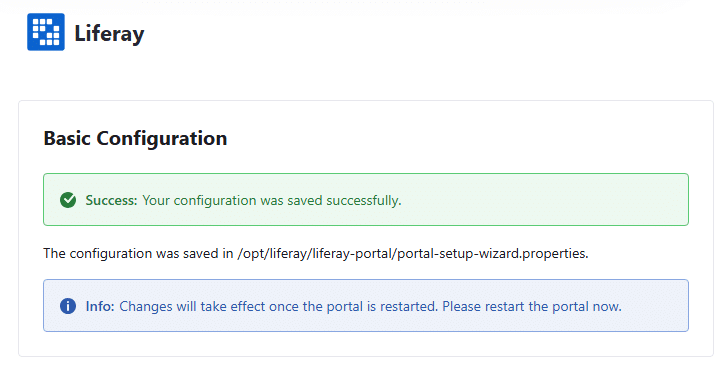
Dopo aver modificato il file si procede al riavvio del portale con systemctl restart liferay
Al primo riavvio occorre riaccedere al portale (https://HAPROXY-IP/) e cambiare la password di default che è “test”
TOMCAT 2
Dopo aver installato la VM eseguire i seguenti comandi:
|
0 1 2 3 4 5 6 7 8 9 10 11 12 13 14 15 16 17 18 19 20 21 22 23 24 25 26 27 28 29 30 31 32 33 34 35 36 |
sudo apt update && sudo apt upgrade -y sudo apt install -y vim curl wget unzip software-properties-common sudo useradd -m -s /bin/bash liferay || true sudo apt install -y wget apt-transport-https gnupg wget -qO - https://packages.adoptium.net/artifactory/api/gpg/key/public | gpg --dearmor | sudo tee /etc/apt/trusted.gpg.d/adoptium.gpg > /dev/null echo "deb https://packages.adoptium.net/artifactory/deb $(. /etc/os-release; echo $VERSION_CODENAME) main" | sudo tee /etc/apt/sources.list.d/adoptium.list sudo apt update sudo apt install -y temurin-21-jdk java -version sudo apt install -y nfs-common sudo mkdir -p /opt/liferay/data sudo mount -t nfs NFS-IP:/srv/liferay-data /opt/liferay/data echo " NFS-IP:/srv/liferay-data /opt/liferay/data nfs defaults,_netdev 0 0" >> /etc/fstab cd /opt sudo mkdir -p /opt/liferay && cd /opt/liferay sudo wget https://github.com/liferay/liferay-portal/releases/download/7.4.3.132-ga132/liferay-portal-tomcat-7.4.3.132-ga132-1739912568.tar.gz -O liferay-bundle.tar.gz sudo tar xzf liferay-bundle.tar.gz sudo wget https://github.com/liferay/liferay-portal/releases/download/7.4.3.132-ga132/liferay-portal-osi-7.4.3.132-ga132-1739912568.tar.gz -O liferay-osgi.tar.gz sudo tar xzf liferay-osgi.tar.gz /opt/liferay/liferay-portal/ cd /opt/liferay ln -s liferay-portal/tomcat/ tomcat sudo chown -R liferay:liferay /opt/liferay keytool -genkeypair -alias tomcat -keyalg RSA -keysize 4096 -validity 3650 -keystore /opt/liferay/tomcat/conf/keystore.jks -storepass ChangeMe -dname "CN=TOMCAT2,OU=IT,O=NPO,L=Turin,ST=ITALY,C=IT" Creare il file /opt/liferay/tomcat/bin/liferay.env impostando i seguenti parametri: JAVA_HOME=/usr/lib/jvm/temurin-21-jdk-amd64 CATALINA_HOME=/opt/liferay/tomcat CATALINA_BASE=/opt/liferay/tomcat Creare il file /opt/liferay/tomcat/bin/start_liferay.sh impostando I seguenti parametri #!/bin/bash export CATALINA_HOME=/opt/liferay/tomcat export CATALINA_BASE=/opt/liferay/tomcat export JAVA_HOME=/usr/lib/jvm/temurin-21-jdk-amd64 export CATALINA_PID=$CATALINA_BASE/temp/tomcat.pid # Avvia Tomcat in background $CATALINA_HOME/bin/catalina.sh start # Scrive il PID del processo Java in CATALINA_PID echo $(pgrep -f 'org.apache.catalina.startup.Bootstrap') > $CATALINA_PID |
Creare il file /etc/systemd/system/liferay.service impostando i seguenti parametri:
|
0 1 2 3 4 5 6 7 8 9 10 11 12 13 14 15 16 |
[Unit] Description=Apache Tomcat Liferay Service After=network.target [Service] Type=simple User=liferay Group=liferay Environment=/opt/liferay/tomcat/bin/liferay.env PIDFile=/opt/liferay/tomcat/temp/tomcat.pid ExecStart=/opt/liferay/tomcat/bin/start_liferay.sh ExecStop=/bin/bash -c 'if [ -f /opt/liferay/tomcat/temp/tomcat.pid ]; then kill $(cat /opt/liferay/tomcat/temp/tomcat.pid); fi' Restart=on-failure RestartSec=10 TimeoutStartSec=300 TimeoutStopSec=60 [Install] WantedBy=multi-user.target |
Modificare il file /opt/liferay/tomcat/bin/setenv.sh impostando i seguenti parametri:
|
0 1 2 3 4 5 6 7 8 9 10 11 12 13 |
CATALINA_OPTS="$CATALINA_OPTS -Djdk.internal.httpclient.disableHostnameVerification=true -Dfile.encoding=UTF-8 -Djava.net.preferIPv4Stack=true -Duser.timezone=GMT -server -Xms4g -Xmx4g -XX:+UseG1GC -XX:MaxNewSize=1536m -XX:MaxMetaspaceSize=768m -XX:MetaspaceSize=768m -XX:NewSize=1536m -XX:SurvivorRatio=7 -Dosgi.console=11311 -Dosgi.console.enable.builtin=true -Djgroups.bind_addr=TOMCAT2 -Djgroups.tcpping.initial_hosts= TOMCAT1[7800], TOMCAT2[7800] -Dexternal-properties=/opt/liferay/portal-ext.properties" export JDK_JAVA_OPTIONS="${JDK_JAVA_OPTIONS} --add-opens=java.base/java.lang=ALL-UNNAMED --add-opens=java.base/java.lang.invoke=ALL-UNNAMED --add-opens=java.base/java.lang.reflect=ALL-UNNAMED --add-opens=java.base/java.net=ALL-UNNAMED --add-opens=java.base/sun.net.www.protocol.http=ALL-UNNAMED --add-opens=java.base/sun.net.www.protocol.https=ALL-UNNAMED --add-opens=java.base/sun.util.calendar=ALL-UNNAMED --add-opens=jdk.zipfs/jdk.nio.zipfs=ALL-UNNAMED" if [ "$1" = "glowroot" ] then GLOWROOT_OPTS="-javaagent:${CATALINA_HOME}/../glowroot/glowroot.jar -Dglowroot.enabled=true" CATALINA_OPTS="${CATALINA_OPTS} ${GLOWROOT_OPTS}" shift fi if [ "$GLOWROOT_ENABLED" = "true" ] then GLOWROOT_OPTS="-javaagent:${CATALINA_HOME}/../glowroot/glowroot.jar -Dglowroot.enabled=true" CATALINA_OPTS="${CATALINA_OPTS} ${GLOWROOT_OPTS}" fi export CATALINA_OPTS |
Modificare il file /opt/liferay/tomcat/conf/server.xml impostando i seguenti parametri:
|
0 1 2 3 4 5 6 7 8 9 10 11 12 13 14 15 16 17 18 19 20 21 22 23 24 25 26 27 28 29 30 31 32 33 34 35 36 37 38 39 40 41 42 43 44 45 46 47 48 49 50 51 52 53 54 55 56 57 58 59 60 61 |
<?xml version="1.0" encoding="UTF-8"?> <Server port="8005" shutdown="SHUTDOWN"> <Listener className="org.apache.catalina.startup.VersionLoggerListener" /> <Listener className="org.apache.catalina.core.AprLifecycleListener" /> <Listener className="org.apache.catalina.core.JreMemoryLeakPreventionListener" /> <Listener className="org.apache.catalina.mbeans.GlobalResourcesLifecycleListener" /> <Listener className="org.apache.catalina.core.ThreadLocalLeakPreventionListener" /> <GlobalNamingResources> <Resource name="UserDatabase" auth="Container" type="org.apache.catalina.UserDatabase" description="User database that can be updated and saved" factory="org.apache.catalina.users.MemoryUserDatabaseFactory" pathname="conf/tomcat-users.xml" /> </GlobalNamingResources> <Service name="Catalina"> <!-- HTTP Connector --> <Connector port="8080" protocol="HTTP/1.1" maxThreads="200" connectionTimeout="20000" redirectPort="8443" maxParameterCount="10000" /> <!-- HTTPS Connector --> <Connector port="8443" protocol="org.apache.coyote.http11.Http11NioProtocol" maxThreads="200" SSLEnabled="true" scheme="https" secure="true" keystoreFile="${catalina.base}/conf/keystore.jks" keystorePass="ChangeMe" clientAuth="false" sslProtocol="TLS" /> <!-- AJP Connector --> <Connector port="8009" protocol="AJP/1.3" redirectPort="8443" secretRequired="false"/> <Engine name="Catalina" defaultHost="localhost" jvmRoute="TOMCAT-2"> <!-- Cluster --> <Cluster className="org.apache.catalina.ha.tcp.SimpleTcpCluster"> <Channel className="org.apache.catalina.tribes.group.GroupChannel"> <Membership className="org.apache.catalina.tribes.membership.StaticMembershipService"> <Member className="org.apache.catalina.tribes.membership.StaticMember" port="4000" host="TOMCAT1" domain="cluster1" uniqueId="{1,1,1,1,1,1,1,1,1,1,1,1,1,1,1,1}"/> <Member className="org.apache.catalina.tribes.membership.StaticMember" port="4000" host="TOMCAT2" domain="cluster1" uniqueId="{2,2,2,2,2,2,2,2,2,2,2,2,2,2,2,2}"/> </Membership> <Receiver className="org.apache.catalina.tribes.transport.nio.NioReceiver" address="TOMCAT-2" port="4000" autoBind="100" selectorTimeout="5000" maxThreads="6"/> <Sender className="org.apache.catalina.tribes.transport.ReplicationTransmitter"> <Transport className="org.apache.catalina.tribes.transport.nio.PooledParallelSender"/> </Sender> <Interceptor className="org.apache.catalina.tribes.group.interceptors.TcpFailureDetector"/> </Channel> </Cluster> <Host name="localhost" appBase="webapps" unpackWARs="true" autoDeploy="true"> <Valve className="org.apache.catalina.valves.ErrorReportValve" showReport="false" showServerInfo="false" /> </Host> </Engine> </Service> </Server> |
Modificare il file /opt/liferay/tomcat/conf/context.xml impostando i seguenti parametri:
|
0 1 2 3 4 5 6 7 8 9 10 11 12 13 14 15 16 17 18 |
<Context path="/" reloadable="false" sessionCookieName="LSESSIONID"> <Manager className="org.apache.catalina.session.PersistentManager" maxIdleSwap="30" minIdleSwap="10" saveOnRestart="true" maxIdleBackup="1000"> <Store className="org.apache.catalina.session.JDBCStore" driverName="org.postgresql.Driver" connectionURL="jdbc:postgresql://DB-IP:5432/lportal" connectionName="liferay" connectionPassword="PASSWORD" sessionTable="tomcat_sessions" sessionIdCol="session_id" sessionDataCol="sessiondata" sessionLastAccessedCol="lastaccess" sessionMaxInactiveCol="maxinactive" sessionAppCol="appname"/> </Manager> </Context> |
Creare il file /opt/liferay/liferay-portal/osgi/configs/com.liferay.portal.search.elasticsearch7.configuration.ElasticsearchConfiguration.config impostando i seguenti parametri:
|
0 1 2 3 4 5 6 7 8 |
operationMode="REMOTE" networkHostAddresses=["ELK-IP:9200"] authenticationEnabled=B"true" username="elastic" password="XXXXX" trustSelfSignedCertificate=B"true" clusterName="liferay" productionModeEnabled=B"true" sidecarEnabled=B"false" |
Creare il file /opt/liferay/portal-ext.properties impostando i seguenti parametri:
|
0 1 2 3 4 5 6 7 8 9 10 11 12 13 14 15 16 17 18 19 20 21 22 23 24 25 26 27 28 29 30 31 32 33 34 35 36 37 38 39 40 41 42 43 |
# Database (PostgreSQL) jdbc.default.driverClassName=org.postgresql.Driver jdbc.default.url=jdbc:postgresql://DB-IP:5432/lportal jdbc.default.username=liferay jdbc.default.password=xxx # File system condiviso per Document Library dl.store.impl=com.liferay.portal.store.db.DBStore dl.file.system.root.dir=/opt/liferay/data # Setup Iniziale setup.wizard.enabled=true schema.run.enabled=true # Avendo eseguito il Setup Iniziale copiare I dati in /opt/liferay/liferay-portal/portal-setup-wizard.properties del nodo uno, ad esempio: admin.email.from.address=xxx.xxx@xxx.xxx admin.email.from.name=Test Test company.default.locale=en_US company.default.time.zone=UTC company.default.web.id=xxx.xxx default.admin.email.address.prefix=xxx.xxx liferay.home=/opt/liferay/liferay-portal setup.wizard.enabled=false # Cluster settings cluster.link.enabled=false cluster.link.bind.addr=TOMCAT2 batch.engine.replicate=false cluster.link.channel.properties.control=/opt/liferay/config/tcp.xml cluster.link.channel.properties.transport.0=/opt/liferay/config/tcp.xml # ELASTICSEARCH 7 elasticsearch.sidecar.enabled=false elasticsearch.embedded.enabled=false search.engine.impl=elasticsearch redirect.url.domains.allowed=HAPROXY-IP redirect.url.ips.allowed=127.0.0.1,TOMACAT1,TOMCAT2,NFS-IP,DB-IP,HAPROXY-IP virtual.hosts.valid.hosts=127.0.0.1,TOMACAT1,TOMCAT2,NFS-IP,DB-IP,HAPROXY-IP users.indexer.enabled=false http.header.version.verbosity=off # Web server (reverse proxy) web.server.forwarded.host.enabled=true web.server.forwarded.protocol.enabled=true web.server.forwarded.port.enabled=true # L’IP locale del nodo (Tomcat) web.server.http.port=8080 web.server.https.port=443 web.server.host=HAPROXY-IP # L’IP dell’HAProxy web.server.public.host=HAPROXY-IP web.server.public.https.port=443 |
Eseguire infine i seguenti comandi:
|
0 1 2 3 4 5 |
chown -R liferay:liferay /opt/liferay chmod +x /opt/liferay/tomcat/bin/start_liferay.sh systemctl daemon-reload systemctl start liferay systemctl status liferay systemctl enable liferay |
L’ambiente installato è raggiungibile via https all’url https://IP-O-FQDN-HAPROXY/:

Dopo aver fatto login provare a spegnere il tomcat su cui si ha fatto accesso verificando nella console del browser il parametro LSESSIONID
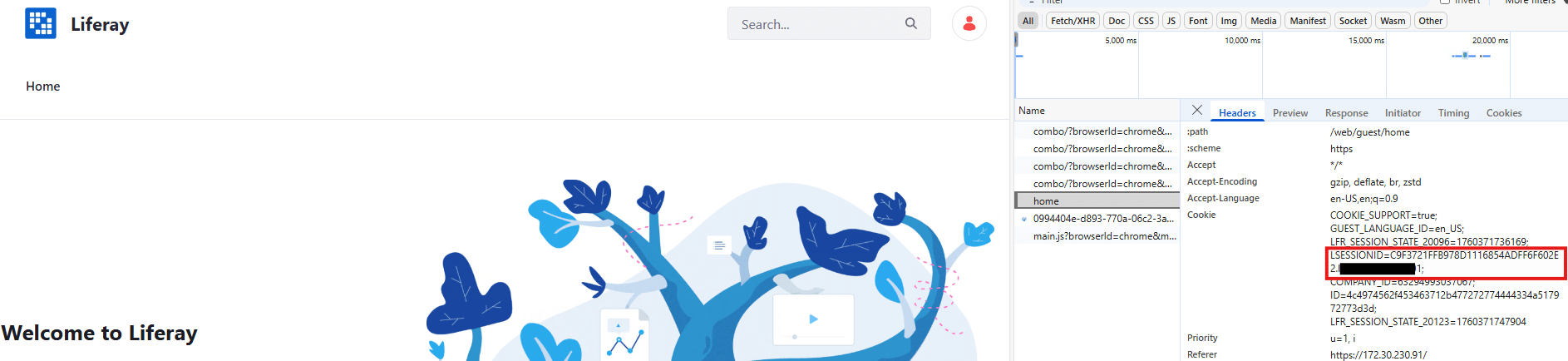
e provare a navigare sul portale.





0 commenti